
How to Score a Test Match: Two Innings, Declarations and Follow-on
Score a Test or two-innings cricket match in the Criconic app: pick 1 to 5 days, declare, enforce the follow-on, call stumps and record a win or draw.
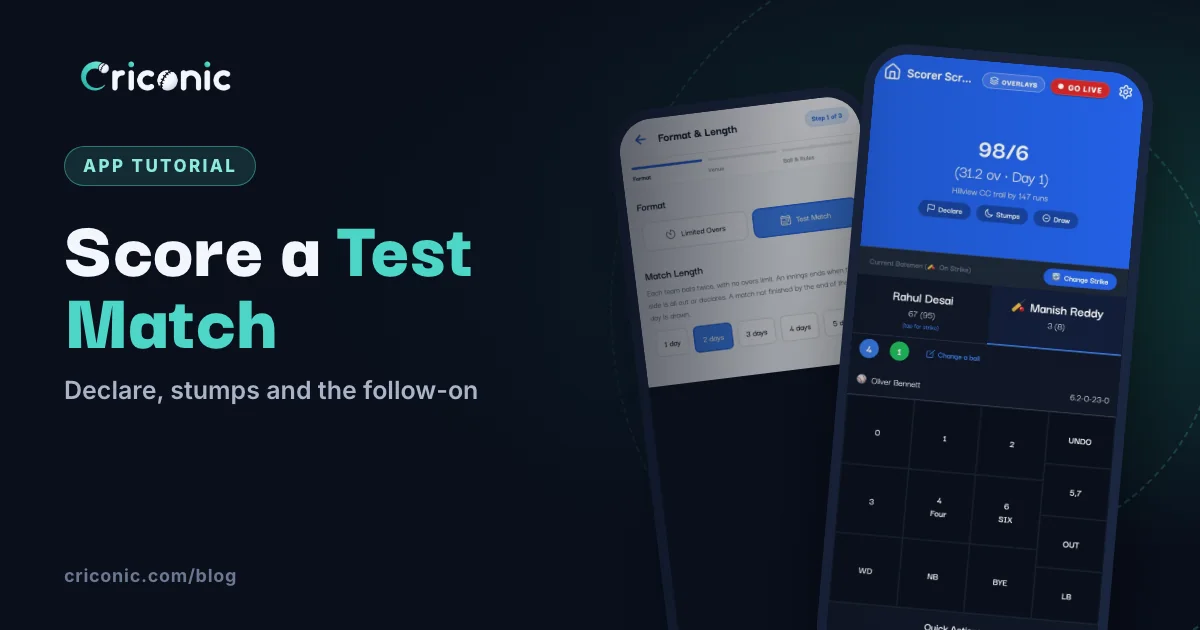
Two-day club fixtures, a weekend Test between two old rivals, a five-day tour match: not all cricket is T20. In a Test, each side bats twice, there's no overs limit, and the scorer has to handle declarations, the follow-on, close of play and the chance of a draw.
This guide shows how to set up and score a Test match in the Criconic app, from picking the format to the final result, and how the runs and wickets count in every player's stats. Scoring, scorecards and stats are free.
How a Test match works
A quick refresher, because the app follows these rules for you:
- Four innings. Team A bats, then Team B, then Team A again, then Team B. With the follow-on, Team B bats twice in a row.
- No overs limit. An innings ends when the side is all out or the captain declares.
- A time limit instead. The match lasts a set number of days. If it isn't finished by the end of the last day, it's a draw.
A Test can end in a win (by an innings, by runs or by wickets), a tie or a draw. If you are new to scoring, read how to score a cricket match first.
1. Choose Test Match when you create the match
Tap Create Match, pick both teams and their squads, and tap Create Match again (the full steps are in how to use a cricket scoring app). On the Format & Overs step:
- Under Format, tap Test Match. The step becomes Format & Length.
- Under Match Length, pick 1 day to 5 days. It starts at 5 days.
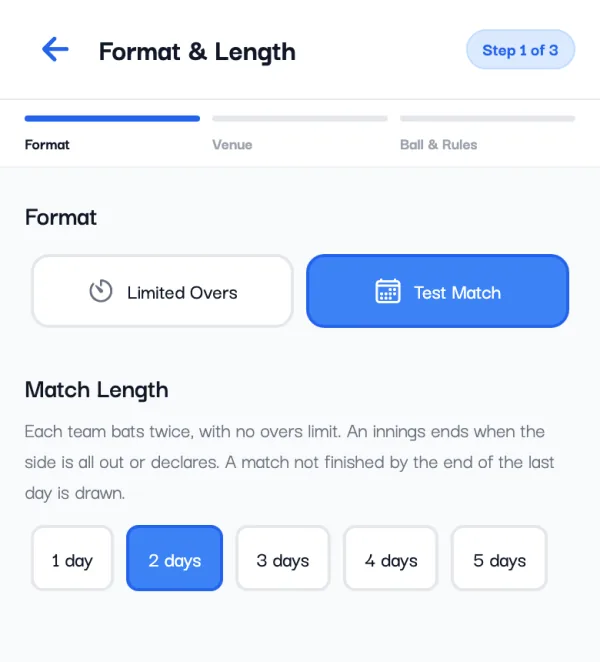
Tap Next: Venue for the date and ground, then Ball, Pitch & Rules. A Test has no free hit and no overs-per-bowler limit, and every over has 6 balls, so those rules don't appear. The rest (a run for a wide or no-ball, re-bowling them, last man standing) work as in any match. Tap Start Match or Schedule.
2. Toss, openers and scoring
The toss and the openers work exactly as in a limited-overs match. Each ball is the same too: runs, extras, wickets and UNDO on the same pad. What changes is the top of the scorer screen:
- The overs have no limit, and the day is shown next to them, like (31.2 ov · Day 1).
- From the second innings, a line shows whether the batting side leads or trails.
- Three buttons sit under the score: Declare, Stumps and Draw.
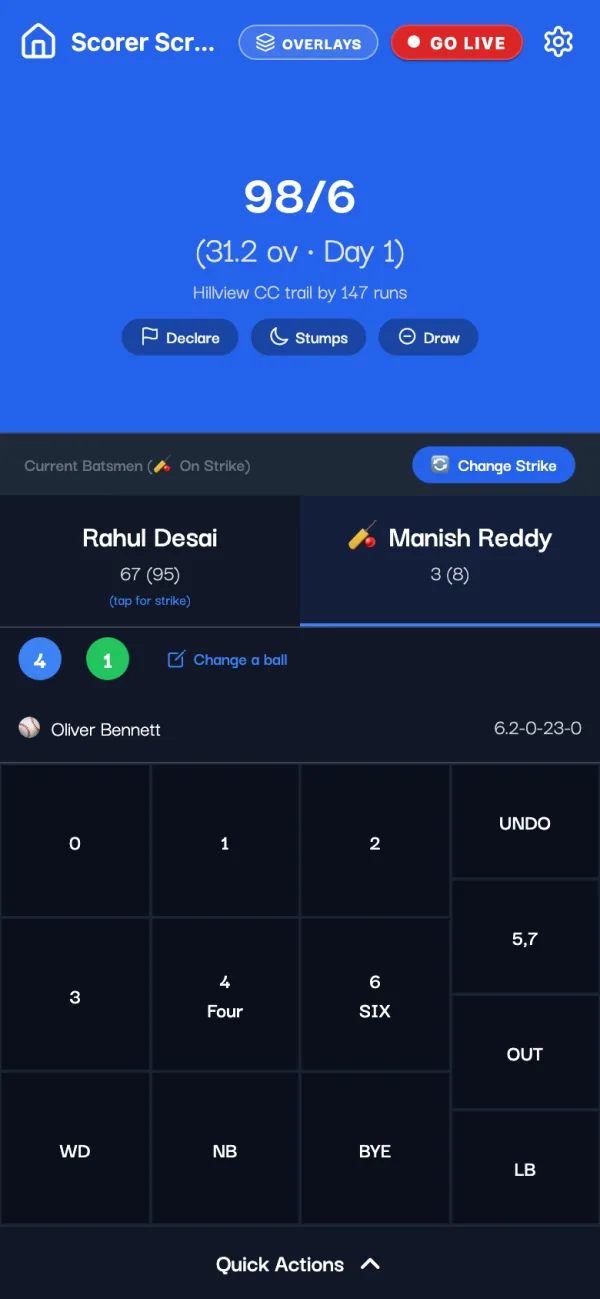
When the last wicket falls, the innings ends by itself. There is no required run rate or projected score, because there are no overs to count down. In the last innings the screen shows the target and the runs still needed.
3. Declare an innings
When the captain declares, tap Declare. The app asks to confirm, for example "Riverside CC will declare at 245/7. This ends the innings." Tap Declare again.
The same action is in the gear menu: Match Settings, then Match Rules, where the End Inning button reads Declare Innings in a Test. On the scorecard a declared total gets a "d", like 245/7d.
4. The innings break and the follow-on
After every innings the app shows End of Innings with the total, and from the second innings on, who leads and by how much. Tap Select Innings 2 Openers (or 3, or 4) to carry on. Ended on a wrongly scored ball? Undo Last Ball is right there, unless the innings was declared. After the third innings it also shows the Target for the side batting last.
After the second innings, if the side that batted first leads by enough, the app offers the follow-on instead:
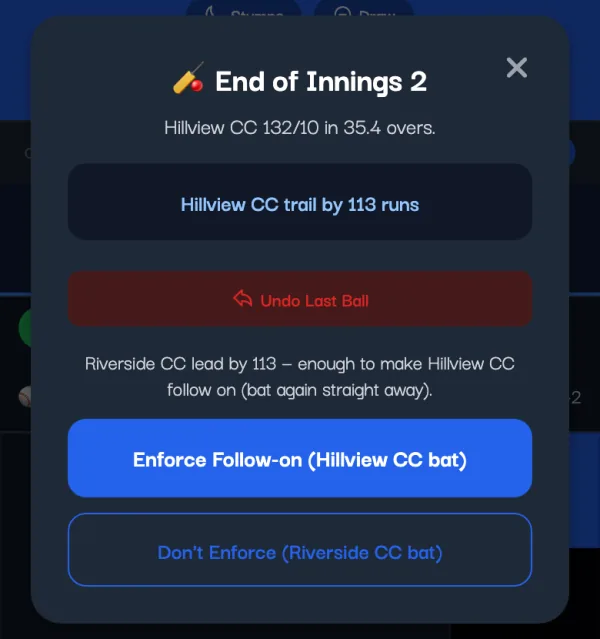
- Enforce Follow-on: the trailing side bats again straight away. On the scorecard that innings is marked "(f/o)".
- Don't Enforce: the leading side bats its second innings as normal.
The lead needed depends on the match length, as in the Laws of Cricket:
| Match length | Lead needed for the follow-on |
|---|---|
| 5 days | 200 runs |
| 3 or 4 days | 150 runs |
| 2 days | 100 runs |
| 1 day | 75 runs |
5. Call stumps at the end of each day
When play ends for the day, tap Stumps, then Call Stumps. The score shows "Stumps, Day 1", and the first ball you score next starts Day 2. The app has no clock: the day only moves on when you call stumps. Lunch and tea need nothing; just carry on scoring.
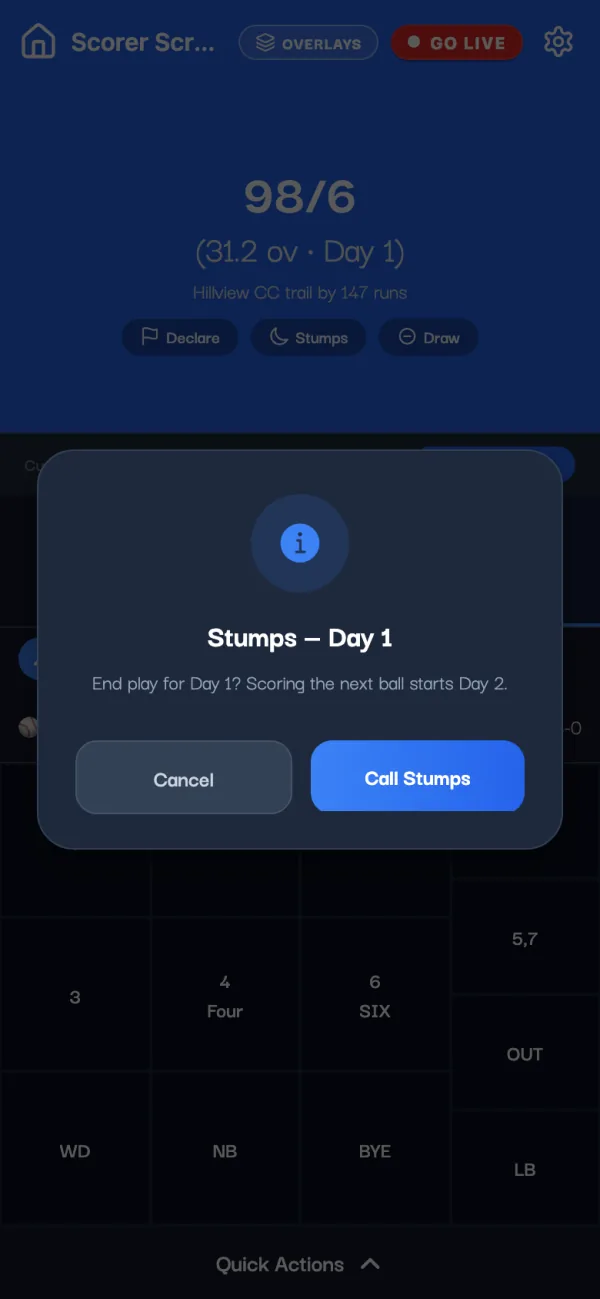
On the last day the dialog changes to Stumps — Final Day. Calling stumps then ends the match as a draw, so tap End as Draw only when play is really over.
6. Finish the match: win, tie or draw
The app works out the result as soon as it's decided:
- The side batting third is all out or declares and is still behind: the other side "won by an innings and" the runs left over.
- The side batting last passes the target: it wins by the wickets it has left.
- It's all out short of the target: the other side wins by runs.
- It's all out with the scores level: "Match tied". Tests have no super over.
For a draw before the last day's stumps (bad light, rain, or both captains agree), tap Draw. The app asks "End the match now with no result? This can't be undone." Tap End as Draw.
Whatever the result, Match Completed! follows. Tap End Match to save it; that is when everyone's stats are updated.
What your followers see
Share the match link as usual (see how to share a live cricket score). On the match page in the app, the Live tab has a Test Match panel: the day (or close of play), the lead or deficit, the follow-on, and the current run rate. The scorecard has a tab for each innings, such as "Riverside CC 1st Inn" and "Hillview CC 2nd Inn (f/o)".
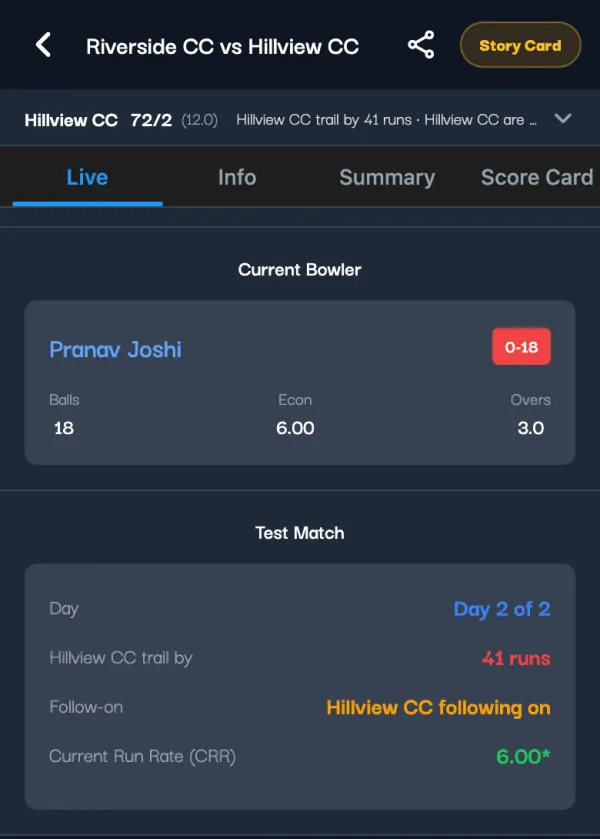
You can also create and score a Test on criconic.com in a browser, with the same declare, stumps, draw and follow-on steps.
How Test stats count
Test runs and wickets go into each player's career like any other match:
- One match, two innings. A Test counts as one match. Each time a player bats or bowls, it counts as one innings, so averages work the normal way.
- Best figures are per innings. Highest score is the best single innings. Best bowling is the best single innings too, not the two innings added together.
- A draw is nobody's loss. A drawn Test counts as a match played, with no win or loss.
- By format. On the profile's stats, the By format card gives Test matches their own row.
In a tournament points table, a drawn Test shares the points like a tie. Tests are left out of net run rate, which needs an overs limit. More on reading the numbers in how to track cricket stats.
Tips for scoring a long match
- Keep the phone online at the innings breaks. The lead, the follow-on and the result are worked out on Criconic's server. Ball-by-ball scoring can carry on offline (see offline cricket scoring).
- A wrong ball in the last innings can't be changed with Change a ball. Undo back to it and score it again.
- No rain rule in a Test: the time lost just makes a draw more likely. DLS is for limited-overs chases (see our DLS calculator guide).
- One player against another instead? That's single wicket, another format the app scores.
Questions
Can I score a Test match in the Criconic app?
Yes. When you create a match, pick Test Match under Format and choose 1 to 5 days. Each side bats twice with no overs limit, and the app handles declarations, the follow-on, stumps and draws.
How do I declare an innings?
Tap Declare under the score on the scorer screen and confirm. The innings ends and the scorecard shows the total with a d, like 245/7d.
Does the app handle the follow-on?
Yes. After the second innings, if the side batting first leads by enough (200 runs in a 5-day match, 150 in 3 or 4 days, 100 in 2 days, 75 in 1 day), the app offers Enforce Follow-on or Don't Enforce.
How do I record a draw?
Tap Draw under the score, or call stumps on the last day. Then tap End Match to save the result.
Do Test matches count in my stats?
Yes. A Test counts as one match and each innings counts separately for batting and bowling. Your profile's By format card shows Tests on their own row.