
How to Edit a Cricket Scorecard: Undo, Change a Ball, Reopen
Scored a wrong ball? Undo it, change an older ball, fix a dismissal, swap the wrong batter or bowler, or reopen a match in the Criconic app. Step by step.
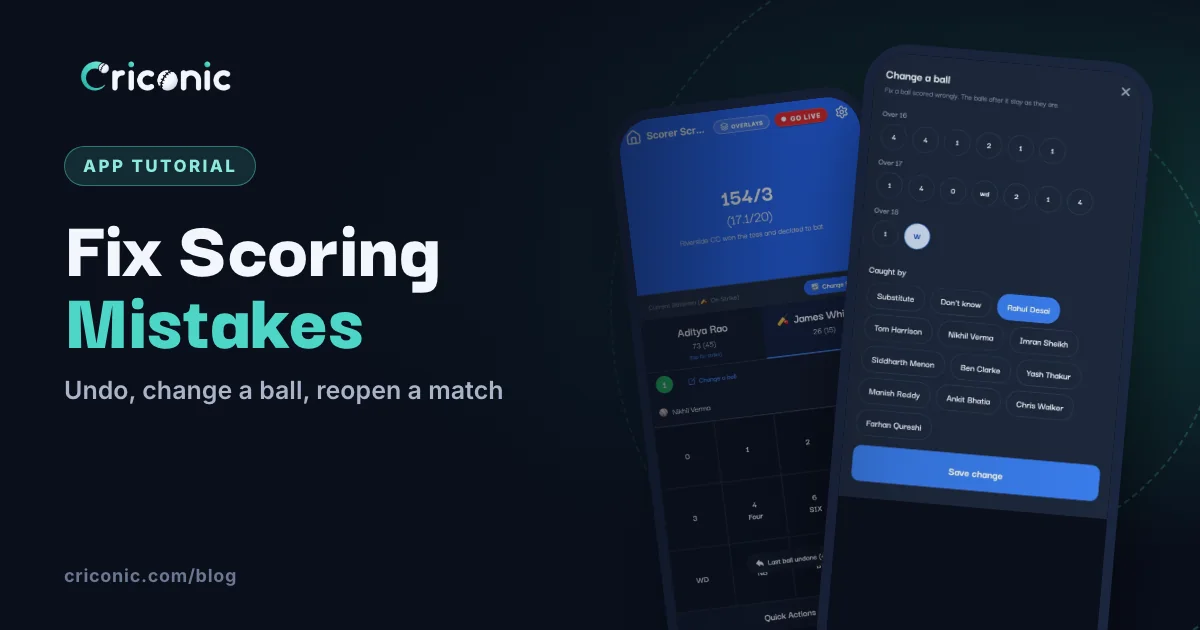
Wrong button, wrong bowler, a four that was actually leg byes. Every scorer makes mistakes, usually when the whole team is shouting at once. The good news: you don't have to start the match again.
This guide shows every way to edit a cricket scorecard in the Criconic app while the match is on, and just after it ends: undo a ball, change an older ball, fix a dismissal, swap the wrong batter or bowler, go back to an innings, and reopen a finished match. Pick the fix that matches your mistake from the table below.
Which fix do I need?
| Mistake | Fix | Where |
|---|---|---|
| Wrong button on the last ball | UNDO | Scoring pad |
| Wrong runs or extras on an older ball | Change a ball | Above the bowler (app) |
| Wrong fielder on a catch, stumping or run out | Change a ball | Above the bowler (app) |
| Wrong type of dismissal, or the wrong batter out | Undo back to that ball | Scoring pad |
| Wrong batter on strike | Change Strike | Above the batters |
| Wrong batter or bowler picked | Replace Batter or Change Bowler | Quick Actions (app) |
| Ended the innings too early | Go back to it | Next innings' openers screen (app) |
| Ended the match by mistake | Reopen match | Match card or match page, for 15 minutes |
1. Undo the last ball
Tapped 4 instead of 1? Tap UNDO on the scoring pad. The ball comes off the score, the batter's and bowler's figures and the over, and a short note shows what was removed, like Last ball undone (4). Then score the ball again the right way.
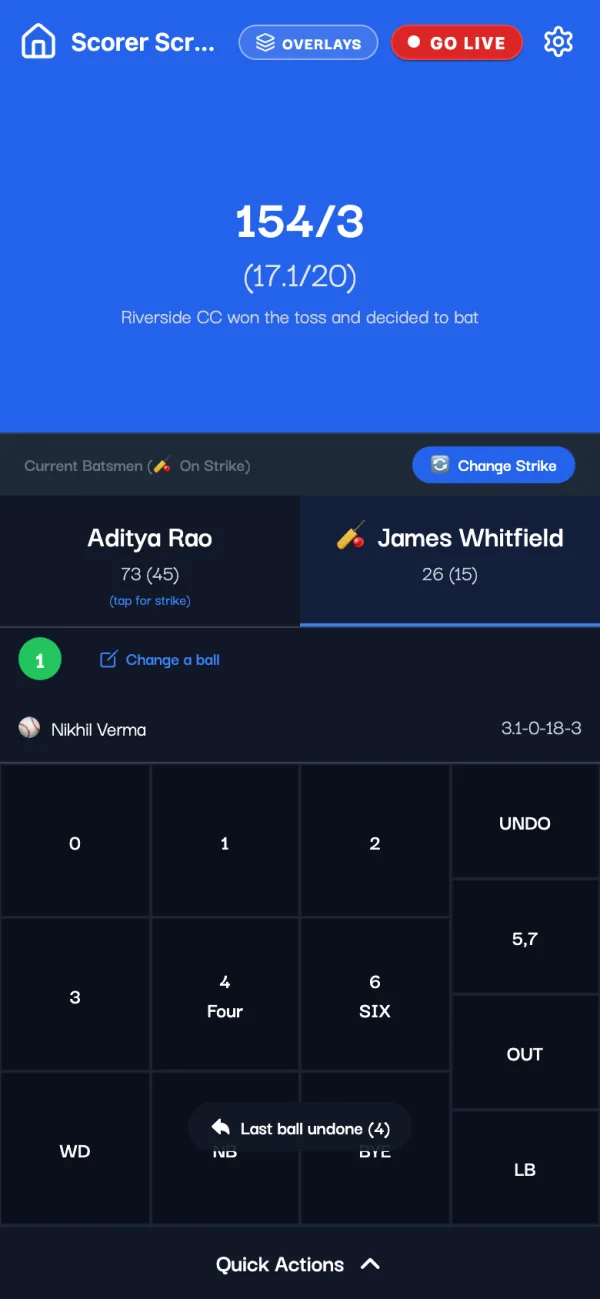
- Tap UNDO again to go further back, one ball at a time. A wicket ball brings the batter back to the crease.
- The pop-ups have Undo Last Ball too: after a wicket (Select Next Batter), at the end of an over (Over Completed!), at the end of an innings and when the match is won. If the last ball was the mistake, you don't need to pick anyone first.
- No signal? UNDO still works. If that ball already reached the server, the app says Undo saved and applies it when you're back online (see offline cricket scoring).
Undo is the right fix when the mistake was the last ball or one or two before it. For an older ball, undoing means scoring every ball after it again, so use Change a ball instead.
2. Change an older ball without undoing the rest
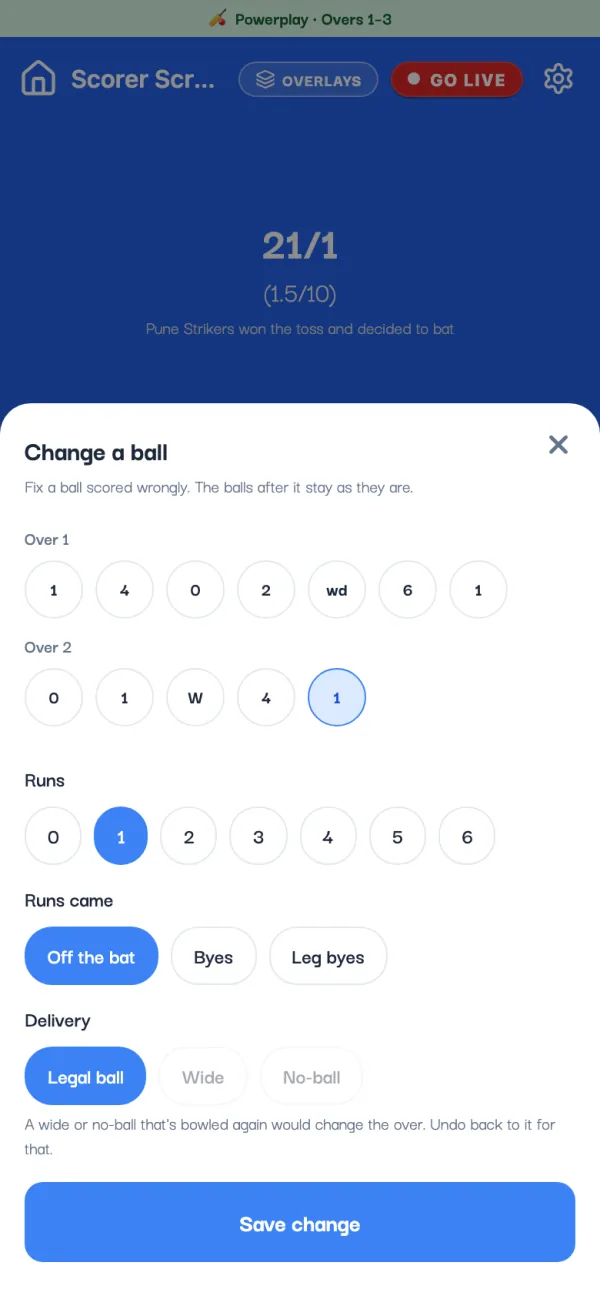
Noticed two overs later that a single was really a leg bye? Tap Change a ball in the strip above the bowler's name, or tap the ball itself in this over. The Change a ball sheet opens with the last three overs of the innings.
- Tap the ball you want to fix. It's highlighted, and its details fill in below.
- Set the Runs (0 to 6), how the Runs came (Off the bat, Byes or Leg byes) and the Delivery (Legal ball, Wide or No-ball).
- For a 4 or a 6 off the bat, the Boundary switch says whether it reached the rope. Turn it off for four runs that were all run.
- Tap Save change. The total, both players' figures and the run rate are worked out again. The balls after it stay as they were.
If the runs change from odd to even (or the other way), the strike may be wrong now. On the last ball the app swaps it for you; on an older ball it reminds you to check, and you tap a batter's name to fix it.
3. Fix a wrong dismissal
What you can fix depends on what went wrong:
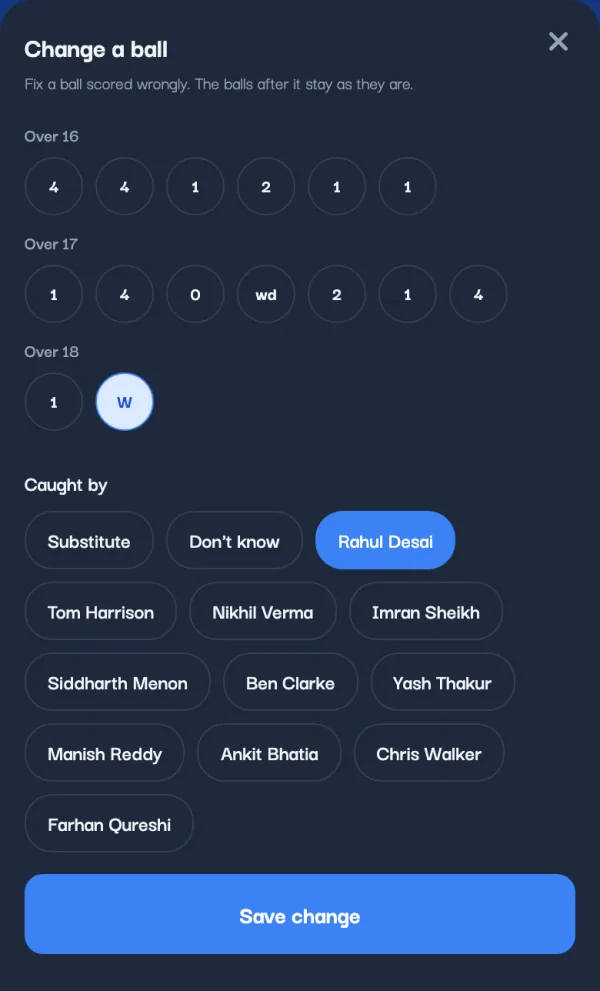
- Wrong fielder on a catch, stumping or run out: open Change a ball and tap the W. Under Caught by, Keeper or Run out by, pick the right player, or Substitute or Don't know, and tap Save change. The batter's line on the scorecard changes too.
- Wrong type of dismissal (bowled instead of caught), the wrong batter out in a run out, wrong runs on a wicket ball or a mankad: undo back to that ball and score it again. Change a ball only edits the fielder on a wicket ball.
- A wicket that wasn't out at all: if it was the last ball, tap Undo Last Ball on the Select Next Batter window before picking anyone.
4. Put the right batter on strike
The app swaps the strike after odd runs and at the end of each over, but it can't see a batter crossing on a catch. If the wrong name has the bat icon, tap Change Strike above the batters, or tap the other batter's name (it says (tap for strike)). Nothing else changes.
5. Picked the wrong batter or bowler?
Two players with the same first name, and you tapped the wrong one. Fix the name without undoing anything: scroll down on the scorer screen and tap Quick Actions.
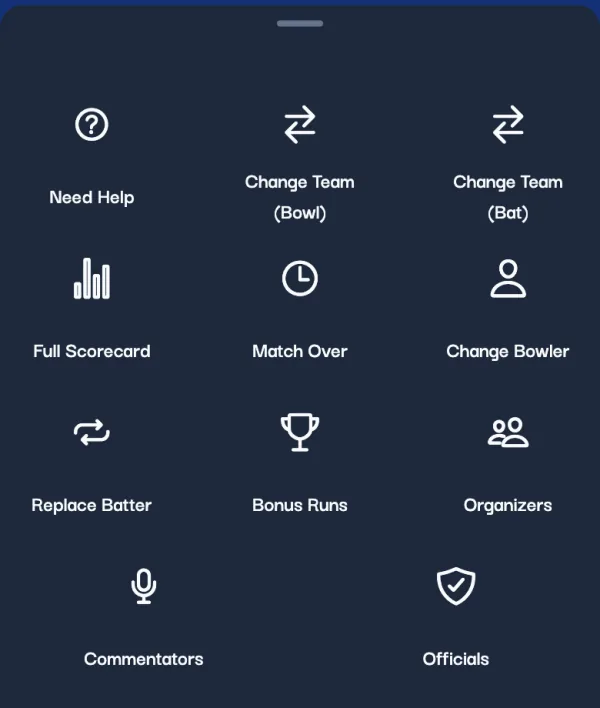
- Replace Batter: pick the batter at the crease who is wrong and tap Done. Then pick the right player (or + Add new) and tap Replace Player. Their runs and balls in this match go to the new name.
- Change Bowler: pick the right bowler and tap Replace Player. The balls of the over being bowled move to them; earlier overs stay with whoever bowled them. The list leaves out the bowler of the previous over, since nobody bowls two in a row.
These need internet. To change the overs of the match in the first innings, Match Over in the same sheet takes a new number, as long as it's more than the overs already bowled. House rules, like wide runs, are in the gear icon's Match Settings (see wide and no-ball rules).
6. Retired batters
A retirement is scored from OUT: Retired and Retired Hurt (can bat again), or Retired Out (can't). The over shows RH or RO instead of a W, and it isn't a ball bowled.
- A batter who can bat again shows up in the Select Next Batter list later. When they come back, the scorecard keeps one line for them that carries on from their runs before.
- Retired the wrong batter, or picked Retired Out instead of Retired Hurt? Undo back to it and record it again. Change a ball doesn't edit retirements.
7. Ended the innings too early? Go back to it
Ended the innings with an over still to bowl, say with End Inning in the gear menu? If the last ball itself was wrong, tap Undo Last Ball on the End of Innings window. If only the ending was wrong, carry on to the next innings' openers screen and tap Ended the innings by mistake? Go back to it, then Go back.
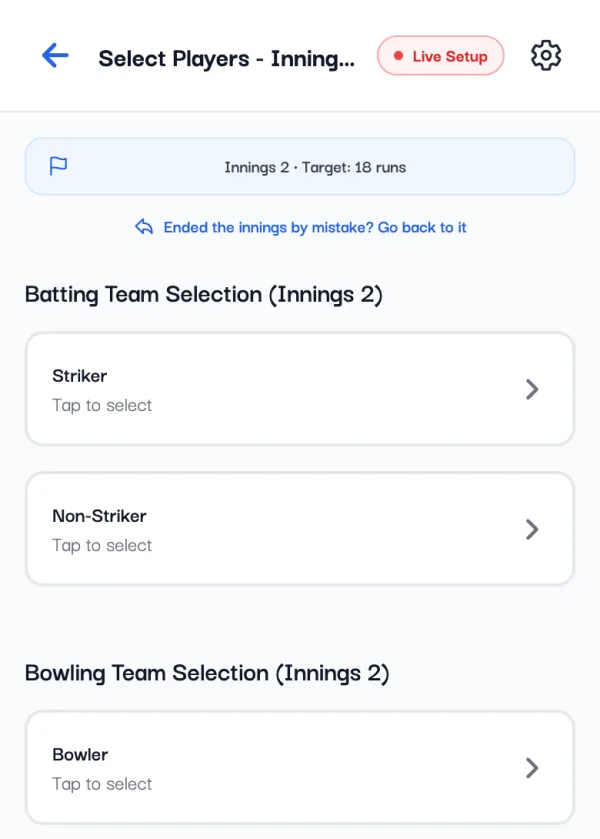
The innings comes back exactly as it was when you ended it, and you carry on scoring it. The link is on the openers screen, so use it before the next innings starts. It needs internet and is in the app only. In a Test match, undo the last ball instead (see our Test match scoring guide).
8. Ended the match by mistake? Reopen it
You tapped End Match, and then someone pointed out a wrong ball in the last over. For 15 minutes after a match ends, its scorers can reopen it:
- Tap the match card on Home or in My Cricket. The menu has Reopen match, with the minutes left. It's also under the score on the match page.
- The app asks Reopen this match? Tap Reopen, and you're back on the scorer screen.
- Undo the last ball, fix what's wrong, and end the match again.
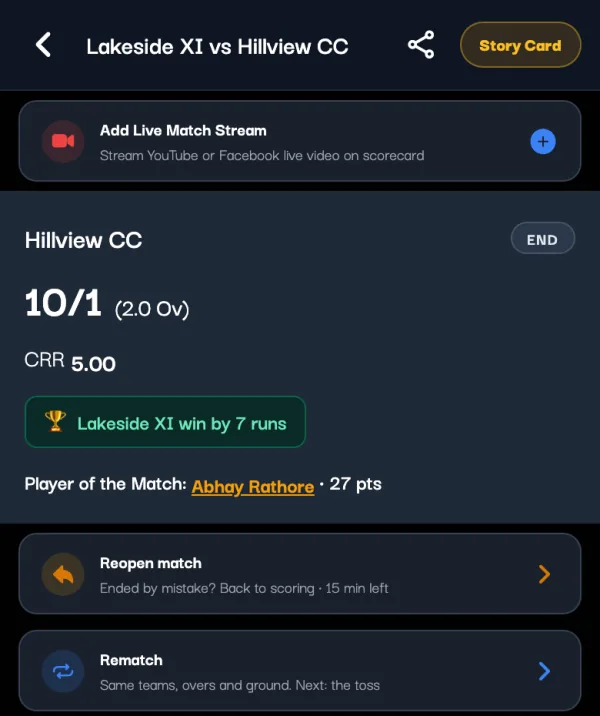
While it's reopened, the result comes off player stats, rankings and the points table, and goes back on when you end it again. On criconic.com, the match page has a Reopen button for the same 15 minutes. After that the button is gone, so check the scorecard before everyone leaves the ground.
What viewers and stats see after a fix
- The live link updates at once. Everyone following the match sees the corrected score straight away, with no refresh (see how to share the live score).
- Commentary follows the fix. An undone ball's line is removed; a changed ball's line is written again to say what happened on it now.
- Career stats count the final scorecard. Player stats, rankings and the points table update when you end the match, so anything you fix before End Match is counted the right way.
Tips to make fewer mistakes
- Check this over at every over break. The strip above the bowler shows each ball. A wrong one is a quick fix now and a long undo later.
- Score from one phone. Only one phone scores a match at a time anyway. If a friend helps, add them as a co-scorer and hand over properly (see how to add a scorer).
- Read the result with both captains before End Match. You have 15 minutes to reopen, but it's easier to get it right the first time.
Questions
How do I undo a ball in a cricket scoring app?
In the Criconic app, tap UNDO on the scoring pad. The last ball comes off the score and the players' figures. Tap it again to go back one more ball.
Can I change a ball from an earlier over?
Yes, in the app. Tap Change a ball above the bowler's name and pick the ball from the last three overs of the innings. You can change its runs, whether they were off the bat, byes or leg byes, and the fielder on a catch, stumping or run out. It needs internet.
How do I change the batsman or bowler after a wrong entry?
Open Quick Actions at the bottom of the scorer screen. Replace Batter swaps the batter at the crease for the right player, and Change Bowler moves the over being bowled to the right bowler. Their figures move with them.
Can I edit a scorecard after the match has ended?
For 15 minutes after the end, yes. Tap the match card, choose Reopen match, fix the score and end the match again. After those 15 minutes it can't be reopened.
I ended the innings by mistake. What do I do?
Before the next innings' first ball, tap Ended the innings by mistake? Go back to it on the openers screen. The innings comes back as it was. In a Test match, undo the last ball instead.
Do people watching see the corrected score?
Yes. The live scorecard updates for everyone as soon as you undo or change a ball.