
How to Add a Scorer to a Cricket Match and Hand Over Scoring
Add a co-scorer to your cricket match in the Criconic app, share scoring between two phones, hand over mid-match, and share teams or tournaments.
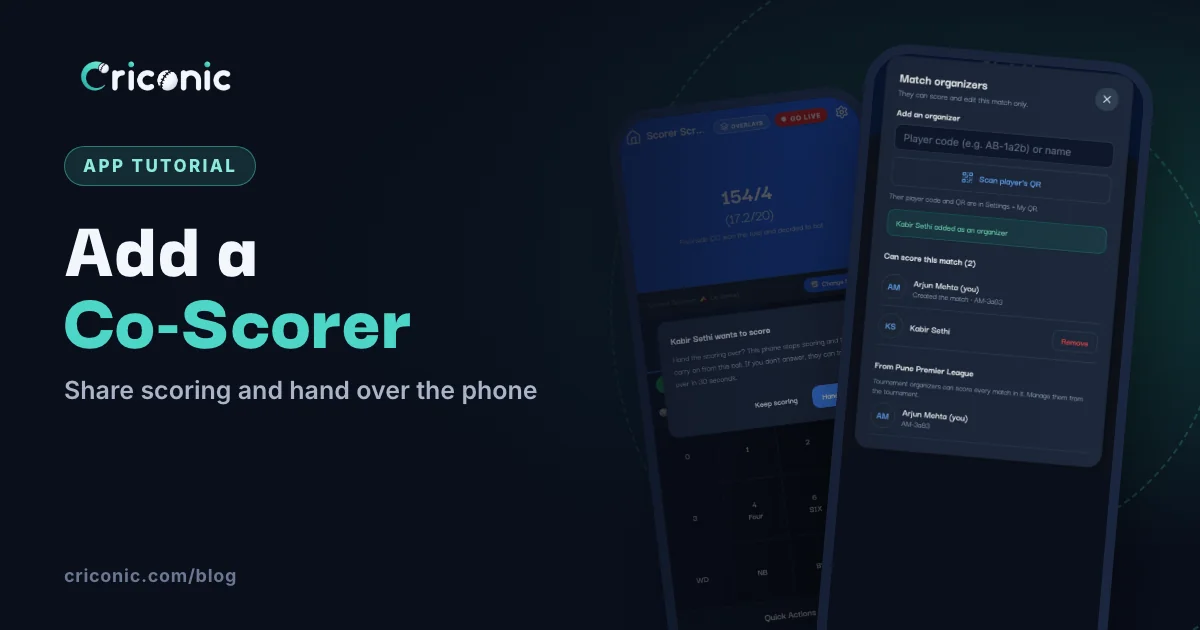
The person who creates the match isn't always the one holding the phone all day. Maybe you open the batting and need someone else to score. Maybe your phone is at 5% by the tenth over. Or your league has three organizers and any of them could be at the ground.
This guide shows how to add a scorer to a cricket match in the Criconic app, how two scorers share one match without mixing up the score, and how to hand scoring over mid-match. It also covers sharing a team or a whole tournament with another organizer.
Who can score a match?
| Who | Can score | How they get access |
|---|---|---|
| The person who created the match | That match | Automatic |
| Co-scorers | That match only | Added to the match (step 1 below) |
| Tournament organizers | Every match in the tournament | Manage Organizers on the tournament |
| A streamer you hire | The match, or every match of the tournament | They accept your request |
| Team organizers | Only matches they create | Team organizers on the team page |
| Commentators and match officials | No | They can follow, not score |
Everyone else can follow the live score, but can't change anything. A co-scorer needs a Criconic account, so you can find them by their player code, name or QR.
1. Add a co-scorer to your match
There are three places to do it in the app, all leading to the same window:
- While creating the match: on the last step, Ball, Pitch & Rules, tap Add co-scorers under Organizers.
- Any time before it ends: tap the match card on Home or in My Cricket, then Add Scorers / Organizers.
- While scoring: scroll down to Quick Actions and tap Organizers.
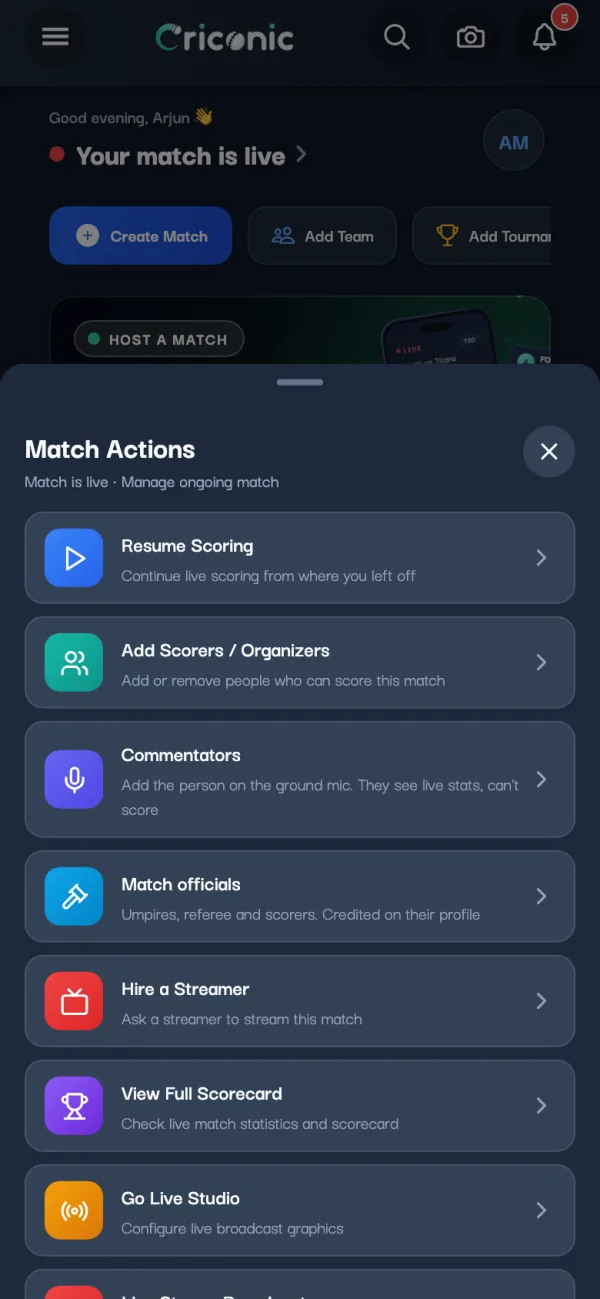
The Match organizers window says it plainly: they can score and edit this match only. To add someone:
- Type their player code (it looks like AB-1a2b) and tap Add. Or type at least two letters of their name and tap Add next to the right person.
- Standing next to them? Tap Scan player's QR and point the camera at their phone. Their code and QR are in their app under Settings → My QR.
- They appear under Can score this match, with the match's creator marked Created the match.
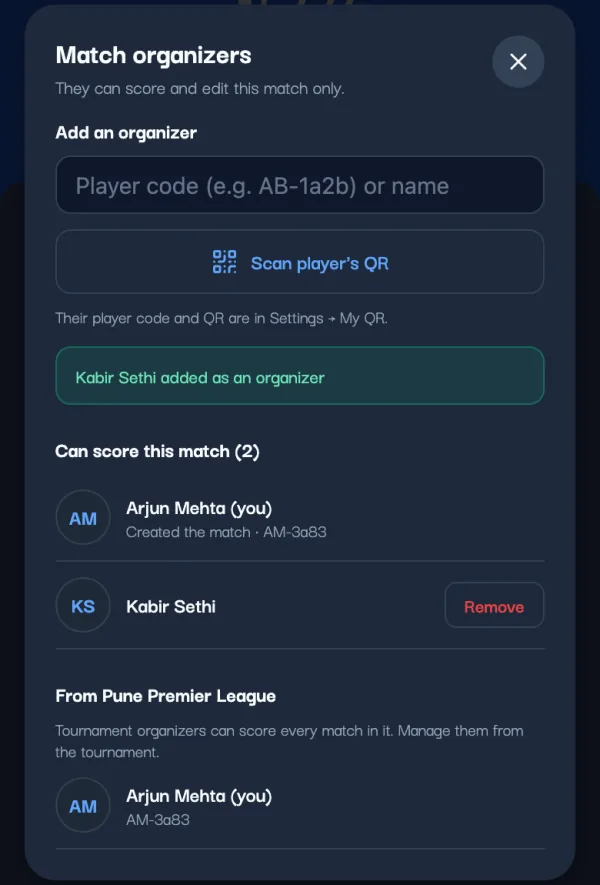
The match now shows in their My Cricket. To score, they tap it and choose Resume Scoring (or Start Scoring if it hasn't started).
2. Two scorers, one phone at a time
You can add as many co-scorers as you like, but only one phone scores a match at a time. That's on purpose: two people tapping the same ball would score it twice.
When a co-scorer opens the scorer while you're scoring, a dark bar at the top names who is scoring, like Arjun Mehta is scoring this match on another phone. If they tap a run anyway, the app says Someone else is scoring and records nothing. Meanwhile they see the live score update with every ball you tap, like any viewer.
3. Hand scoring over mid-match
Your turn to bat? Here's the clean way to pass the scoring to a co-scorer:
- On their phone, they open the scorer and tap Ask to score on the dark bar.
- A window pops up on your phone with their name, like Kabir Sethi wants to score: "This phone stops scoring and they carry on from this ball." Tap Hand over. (Keep scoring says no, and their bar says They want to keep scoring.)
- They score the next ball on their phone. Your phone can't score now, so no ball is counted twice.
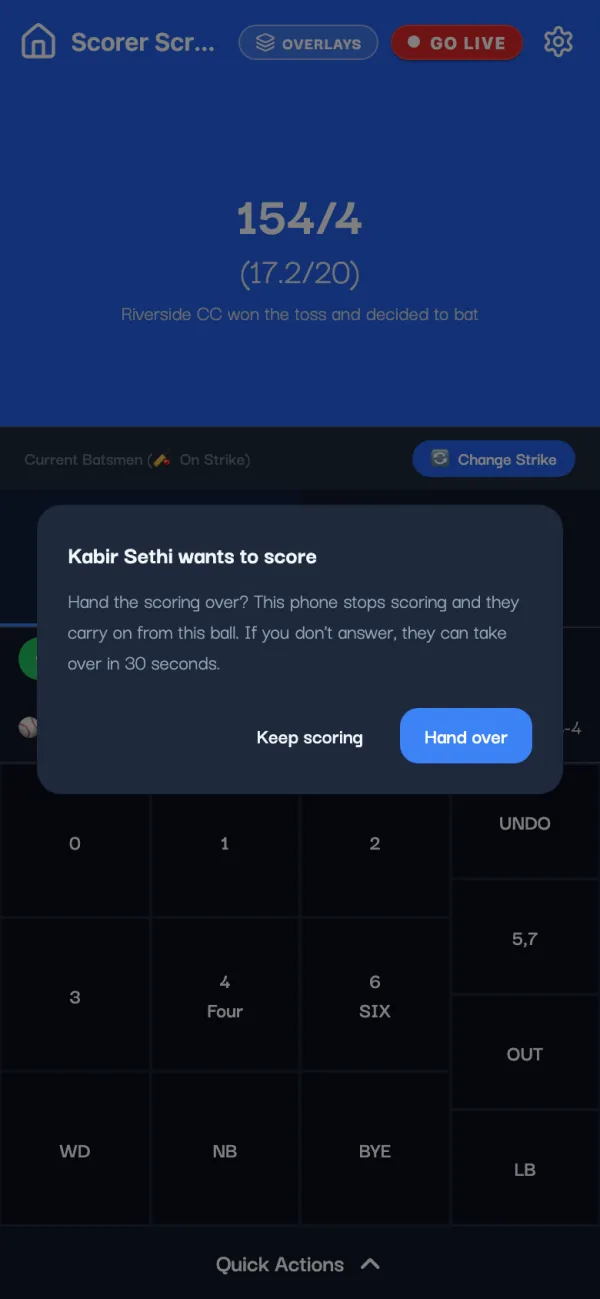
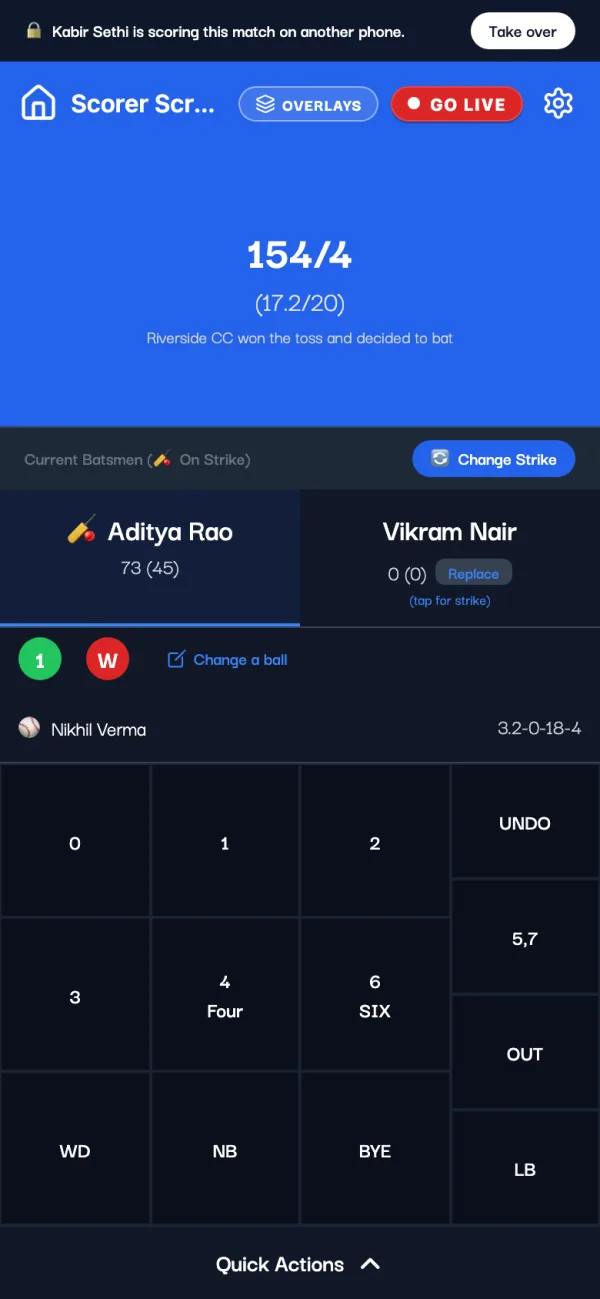
Even simpler: just leave the scorer screen on your phone. Scoring is let go the moment you leave, and the co-scorer can start right away.
4. When the scoring phone dies or loses signal
Battery dead, phone in a kit bag, scorer gone to bat. You won't be stuck:
- No answer in 30 seconds: after a co-scorer taps Ask to score, a Take over button appears for them when 30 seconds pass without an answer.
- The phone goes quiet: a phone that stops checking in (switched off, app in the background, no signal) lets go of the match about two minutes later, and the next scorer can carry on.
- The match creator sees Take over straight away, without asking.
If the first phone scored some balls offline before it lost the match, they stay on that phone. When it's back, its bar shows the actions that weren't sent, with Discard if the new scorer already scored those balls. More in our offline scoring guide.
5. Remove a co-scorer
Open the same Match organizers window, tap Remove next to the person and confirm (or tap Keep). Anyone who can score the match can add or remove co-scorers, but nobody can remove the person who created it. To step down yourself, tap Remove next to your own name and then Leave.
6. Let your organizers score every tournament match
Running a league? Add your fellow organizers to the tournament once, instead of to every match. On the tournament page, Overview tab, tap Manage Organizers: "They can edit this tournament and score all its matches." Add them by player code, name or QR, the same way.
In each match's Match organizers window they're listed under the tournament's name, managed from the tournament. Streamers you hire for the whole tournament score its matches too (see how to hire a cricket live streamer). Only the tournament's owner can delete it. Setting up the league itself is in our tournament tutorial.
7. Share a team with another organizer
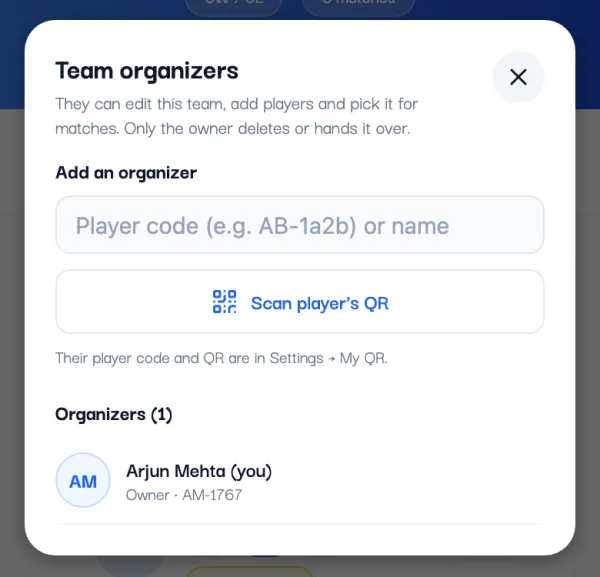
Your captain also picks the team for matches? Open the team page, tap the people icon at the top, and add them in Team organizers. They can edit the team, add players and pick it for matches. Only the owner deletes the team or hands it over.
8. Share all your teams and tournaments at once
A streamer and an organizer, or two friends running the same club, often end up making the same teams twice, and every player gets a duplicate. Share Access fixes that. Open the menu (top left) and tap Share Access. On criconic.com, it's in Settings.
- Under Share with someone, type their player code or name, or scan their QR.
- Switch on All my teams, All my tournaments or both, and tap Share.
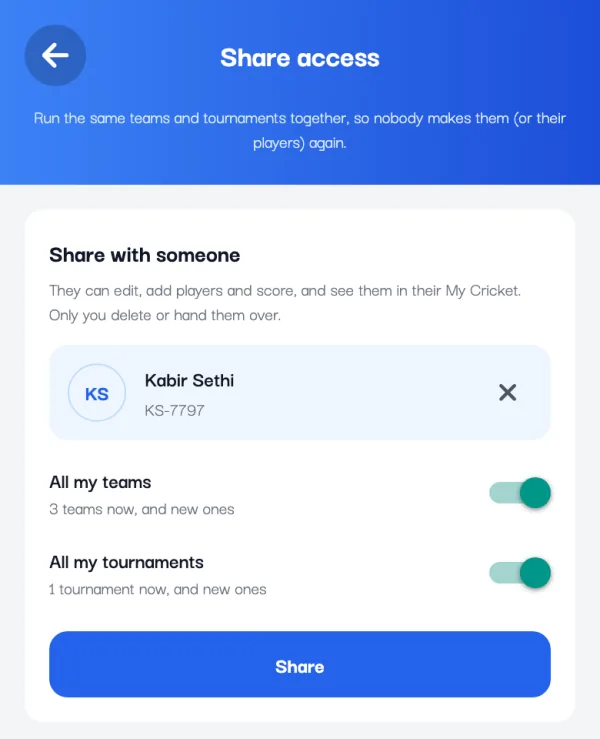
- They become an organizer of each one, and it all shows in their My Cricket.
- New teams and tournaments you make later are shared too.
- Only you can delete them, or hand a team over. Only what you own is shared, so they can't pass it on.
- You can share with up to 20 people. Remove stops sharing (what they scored stays), and they can Leave from their side.
Adding players while you score
A player turns up after the toss? Any scorer of the match can add a player to either team in it with + Add Player, even a team they don't run. You don't need to call the team's owner.
The other side's twelfth man takes a catch? For a catch or a run out by a sub who isn't in the squad, pick Substitute as the fielder. Under Who was the sub? (optional), tap one of the team's other players or type the name. The scorecard shows the sub's name, and no fielder gets credit for it. Picked the wrong fielder? See how to edit a cricket scorecard.
Commentators and officials can't score
The same menus have Commentators (the person on the ground mic, who sees live stats) and Match officials (umpires, referee and scorers, credited on their profile). Neither can score. If your official scorer should actually tap the balls, add them as a co-scorer as well.
Questions
How do I add a scorer to my cricket match?
In the Criconic app, tap your match card and choose Add Scorers / Organizers. Add the person by player code, name or by scanning their QR. They can then score and edit that match.
Can two people score the same match?
Two or more people can have scoring access, but only one phone scores at a time, so no ball is counted twice. The other scorer can ask to take over at any point.
How do I change the scorer in the middle of a match?
The new scorer opens the scorer and taps Ask to score. On the scoring phone, tap Hand over. If nobody answers in 30 seconds, they can take over.
What if the scorer's phone switches off?
A phone that stops checking in lets go of the match about two minutes later, and a co-scorer can carry on. The person who created the match can take over straight away.
Can a team organizer score our team's matches?
They score the matches they create. For a match someone else created, add them as a co-scorer of that match. Tournament organizers score every match in their tournament.
Do co-scorers need the app?
They need a Criconic account. They can score in the app, which also works offline, or on criconic.com in a browser.