
Last Man Standing in Cricket: Rules, and How to Set Match Rules in the App
Last man standing cricket rules explained, plus how to set your gully cricket house rules in the app: 5-ball overs, wides, no-balls, free hit and bowler limits.
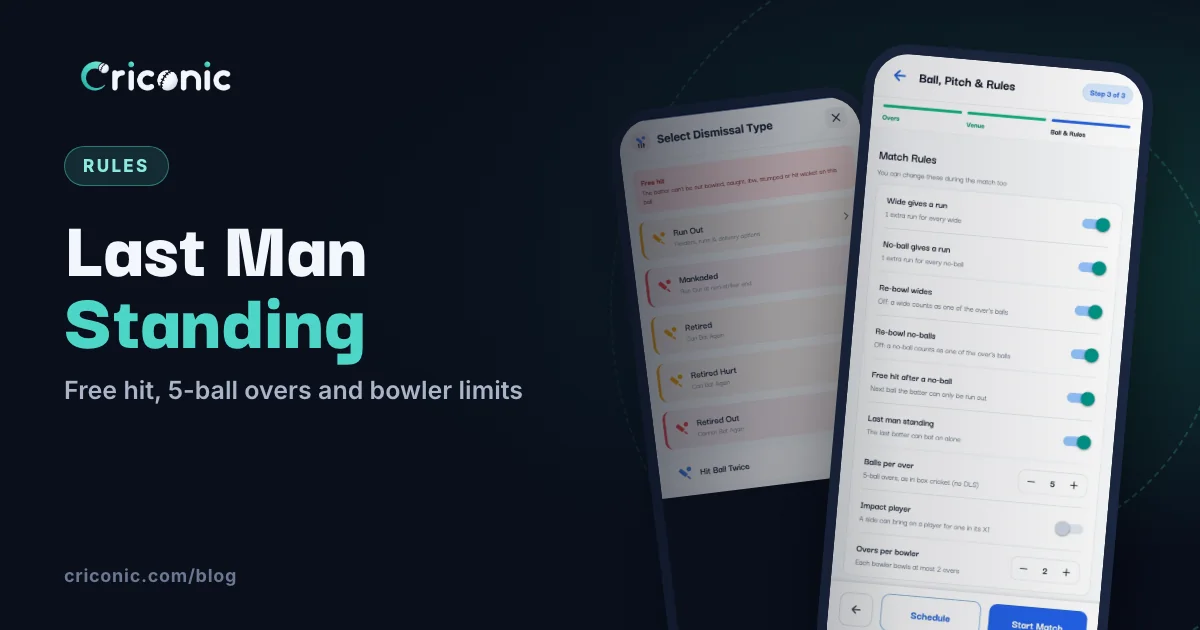
Seven of you turned up, the other side has eight, and the sixth wicket falls with 20 still needed. In proper cricket the innings is over: one batter can't bat without a partner. In gully cricket, someone always shouts "last man khelega!" That's last man standing.
This guide explains the last man standing rule, how the Criconic app scores it, and how to set every other house rule in the app: overs, 5-ball overs, wides and no-balls, free hit, overs per bowler and impact player. Agree them at the toss, set them once, and the app scores by your rules.
What is last man standing in cricket?
Normally an innings ends when all but one batter are out. With eleven players that's 10 wickets: the last batter is left "not out" because there's nobody to bat with.
Last man standing (also called last man stands or last man batting) lets that last batter carry on alone. They keep batting until they're out or the overs run out. It's common wherever teams are small or uneven: gully cricket, box cricket, tennis-ball games and short-handed club friendlies.
- The lone batter faces every ball. There's no partner to rotate the strike with.
- They run their own runs, with no runner.
- Once they're out, everyone is out and the innings ends.
Groups differ on the small print, like how far the lone batter has to run for a run and at which end they can be run out. Settle it at the toss, together with your box cricket or tennis-ball cricket house rules.
How the app scores last man standing
Turn on Last man standing ("The last batter can bat on alone") in your match rules (step 5 below). It's off by default. With it on:
- No new batter is asked for when the second-last wicket falls. The batter who's left gets the strike and bats alone.
- The strike never changes. A single, a three or the end of an over leaves the same batter on strike, because there's nobody to swap with.
- Runs count as you tap them. The app doesn't care how far they ran, so your house rule decides what a run is.
- All out means everyone. A 7-a-side team is all out at 7 wickets, not 6.
Forgot to turn it on? You can switch it on from the scorer's settings during the match (step 8), as long as the second-last wicket hasn't fallen yet. In single wicket, where each player bats alone anyway, it's always on and the switch is hidden.
Every match rule in the app at a glance
| Rule | What it does | Where to set it | App or website |
|---|---|---|---|
| Number of Overs | Overs a side: 6 to 30 from the list, or Custom Overs up to 50 | Match setup, Overs step | Both |
| Balls per over | 4 to 10 legal balls an over. 6 is standard | Match setup. Fixed once the first ball is bowled | Both |
| Wide gives a run | 1 extra run for every wide. On by default | Match setup, or Match Rules during the match | App. Website scorer: Count Wide Run |
| No-ball gives a run | 1 extra run for every no-ball. On by default | Match setup, or Match Rules during the match | App. Website scorer: Count No Ball Run |
| Re-bowl wides | On: the wide is bowled again. Off: it counts as one of the over's balls | Match setup, or Match Rules during the match | App only |
| Re-bowl no-balls | On: the no-ball is bowled again. Off: it counts as one of the over's balls | Match setup, or Match Rules during the match | App only |
| Free hit after a no-ball | The next ball is a free hit: the batter can't be out bowled, caught, lbw, stumped or hit wicket | Match setup, or Match Rules during the match | App only |
| Last man standing | The last batter bats on alone. Off by default | Match setup, or Match Rules during the match | App. Website scorer: Allow Single Batsman |
| Overs per bowler | The most overs one bowler can bowl. No limit by default | Match setup, or Match Rules during the match | App only |
| Impact player | A side can bring on a player for one in its XI, once or twice | Match setup. Fixed once the first ball is bowled | Both |
1. Find the match rules
Start a match as usual: tap the blue +, then Create Match, pick both teams and their squads (step by step in how to use a cricket scoring app). Setup then walks through Overs, Venue and Ball & Rules. The last step, Ball, Pitch & Rules, has a Match Rules card with every rule in one place.
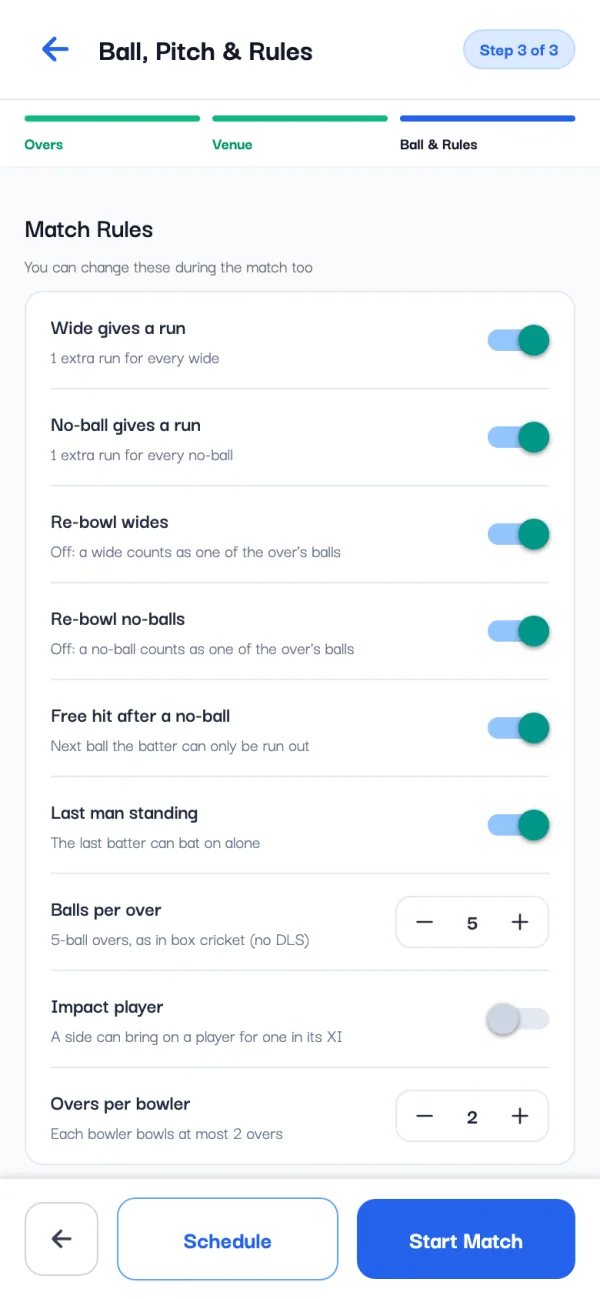
The line under the title says where the rules came from. Same as your last match means the app copied your previous match's rules, so a regular group sets them only once. The tournament's rules means the organizer set them for every match (step 9).
2. Overs and balls per over (5-ball overs)
In the Overs step, tap one of the Number of Overs buttons (6 to 30) or Custom Overs for any number from 1 to 50.
Balls per over sits on the Match Rules card. Tap + or - to pick anything from 4 to 10 legal balls. At 6 it reads Standard 6-ball overs; at 5 it reads 5-ball overs, as in box cricket (no DLS).
- The scorer ends each over after that many legal balls.
- Overs show in that length: 3.4 means 3 overs and 4 balls. Run rates are per over of that length.
- The DLS calculator works with 6-ball overs only.
- It can't change once the first ball is bowled. The card then says Fixed once the first ball is bowled.
3. Wides and no-balls
Four switches cover the two questions every gully match argues about:
- Wide gives a run and No-ball gives a run: on, each wide or no-ball adds 1 extra run. Off, it adds none (runs the batters take still count).
- Re-bowl wides and Re-bowl no-balls: on, the ball is bowled again and the over gets no shorter. Off, it counts as one of the over's balls.
So "no run for a wide, bowl it again" is Wide gives a run off and Re-bowl wides on. "One run, and it counts as a ball" is Wide gives a run on and Re-bowl wides off. Not sure what your league plays? See wide ball and no-ball rules.
4. Free hit after a no-ball
With Free hit after a no-ball on, the ball after every no-ball is a free hit. It's on when you set up your first match, and after that it follows your last match like the other rules. Here's what the app does with it:
- The scorer shows a red FREE HIT tag on the next ball.
- If you tap OUT on that ball, the Select Dismissal Type sheet says the batter can't be out bowled, caught, lbw, stumped or hit wicket, and leaves those out. Run Out, Hit Ball Twice and the retirements stay.
- If the free hit is itself a wide or a no-ball, the next ball is a free hit too.
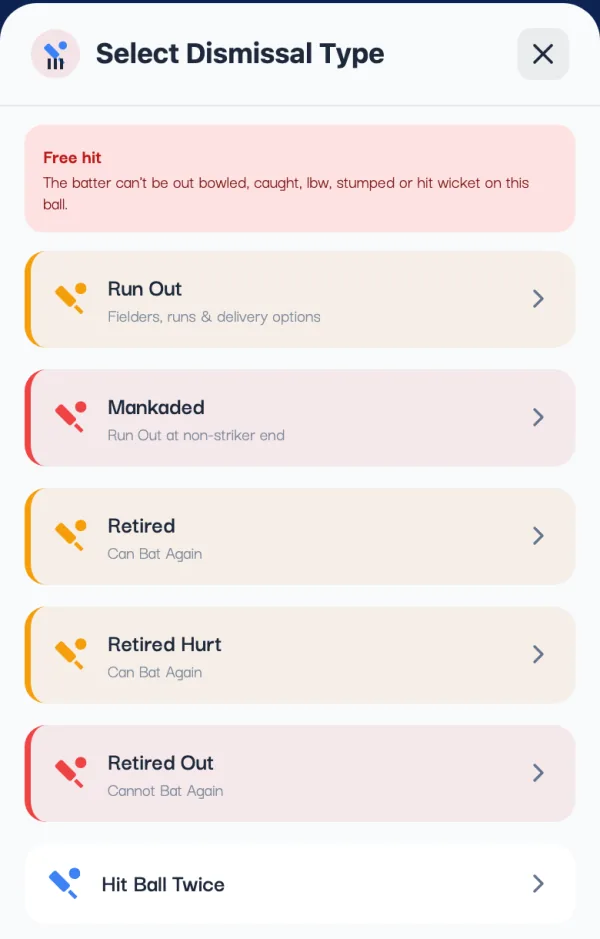
Field restrictions on a free hit are up to your umpire: the app only scores the ball. Test matches have no free hits, so the switch is hidden there.
5. Last man standing
Switch on Last man standing if the last batter bats alone in your games. How it's scored is explained above. Remember the 10-wicket limit: with eleven a side, the innings still ends at 10 down.
6. Overs per bowler
Overs per bowler starts at No limit. Tap + to set a limit, or tap the suggestion under it, such as Set 4 overs (usual for 20 overs): a fifth of the match's overs, rounded up. The limit can't be more than the match's overs.
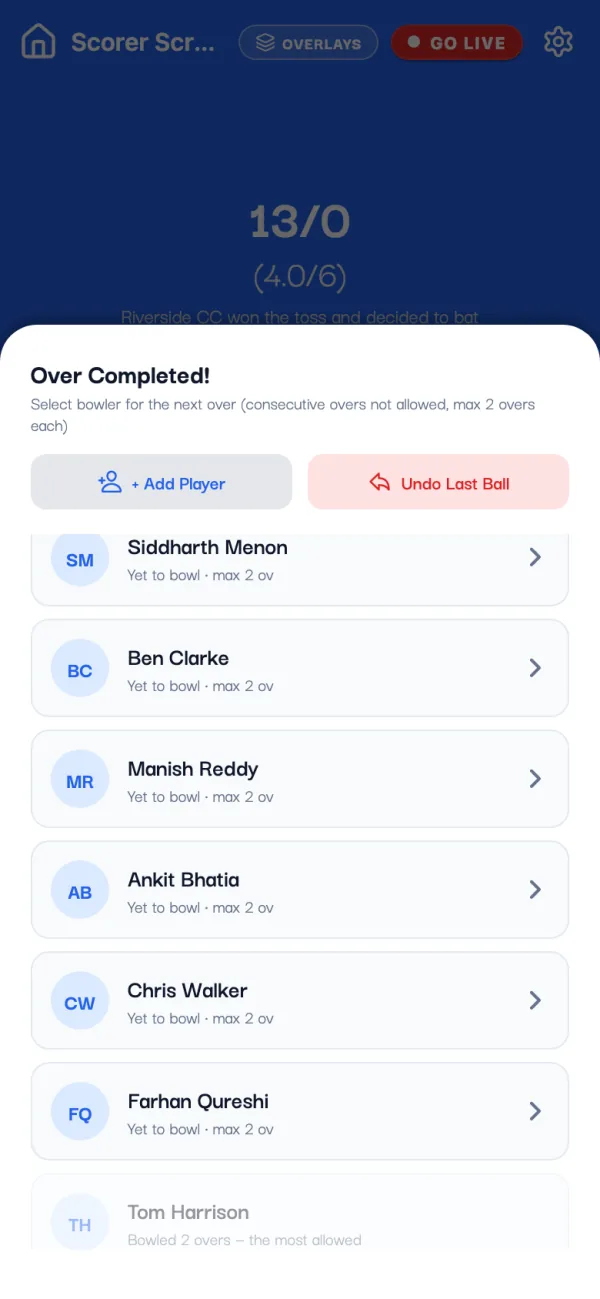
At the end of each over, the Over Completed! sheet lists your bowlers with their figures and the limit. A bowler who has used up their overs is greyed out and can't be picked: Bowled 2 overs — the most allowed. A super over has no limit.
7. Impact player
Impact player ("A side can bring on a player for one in its XI") lets each team swap in a player from outside the match squad. Turn it on and pick Substitutions per side: 1 or 2. It has to be set before the first ball.
During the match, an Impact player button appears when a swap is allowed: before an innings, at the end of an over or when a wicket falls. The player going off can't bat or bowl again, and the team is still all out when its XI is.
8. Change a rule during the match
Agreed something new at the drinks break? On the scorer screen, tap the gear at the top to open Match Settings, then open Match Rules. It's the same card as in setup.
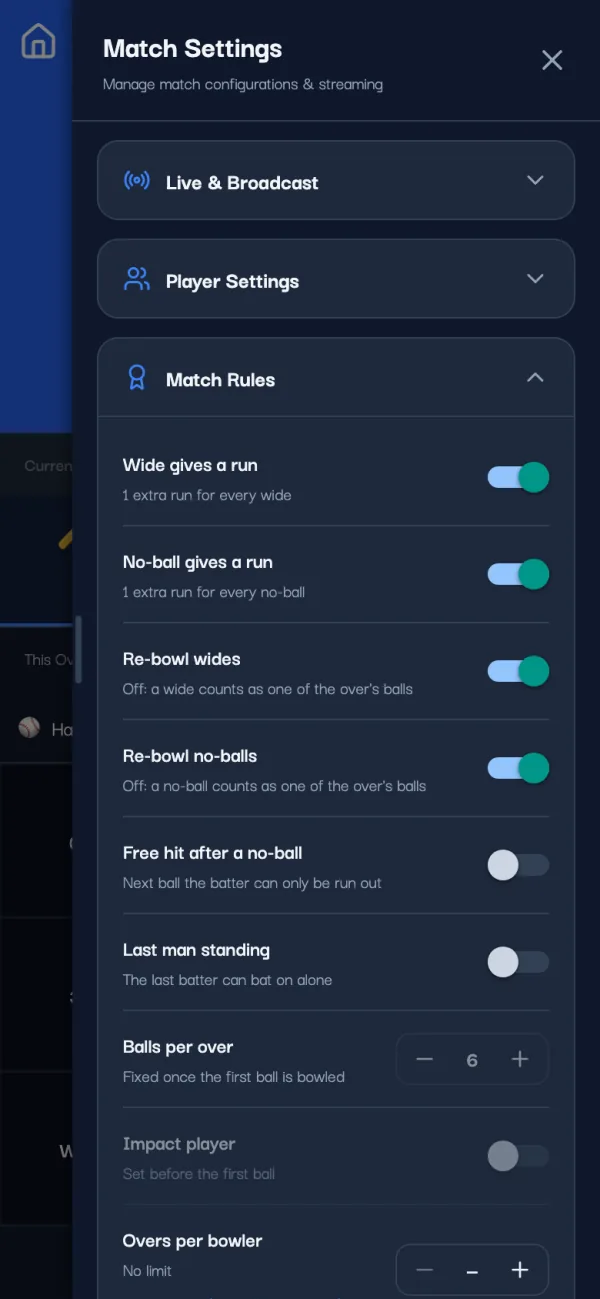
- Can change any time: wide and no-ball runs, re-bowl wides and no-balls, free hit, last man standing and overs per bowler. Balls scored after the change follow the new rule.
- Locked once the first ball is bowled: balls per over and impact player.
Anyone who can score the match can change them, so agree first and change once.
9. Set the rules once for a whole tournament
Running a league? On the tournament page, tap the Match rules card ("Set the overs, ball and rules once for every match"). The Match defaults sheet sets the overs, ball, pitch and the same rules for every new match and fixture of the tournament. Scorers can still change them for one match. More in how to create a cricket tournament.
Gully cricket rules to agree before the toss
Settle these with the other captain, then set the ones the app scores:
- Players a side, and what happens if one team is short
- Overs a side, and balls per over (5-ball overs are common in short games)
- Wides and no-balls: a run or not, bowled again or not
- Free hit after a no-ball, or not
- Last man standing, and what counts as a run for the lone batter
- Overs per bowler
- Local rules the app doesn't score for you, like one-tip-one-hand catches or a hit over the wall being out: score them as what happened, a wicket or the runs
Questions
What is the last man standing rule in cricket?
When all the other batters are out, the last batter keeps batting alone instead of the innings ending. They face every ball and run their own runs until they're out or the overs run out.
How does the Criconic app score last man standing?
Turn on Last man standing in the match rules. When the second-last wicket falls, the remaining batter bats alone and keeps the strike, and the team is all out only when every player is out. The app still ends an innings at 10 wickets, so it matters for teams of 10 or fewer.
How do I play 5-ball overs in the app?
On the Match Rules card, set Balls per over to 5 before the first ball. The scorer then ends each over after 5 legal balls. You can pick anything from 4 to 10.
What does the free hit setting do?
With Free hit after a no-ball on, the ball after a no-ball is marked FREE HIT on the scorer, and the Out options leave out bowled, caught, lbw, stumped and hit wicket. A wide or no-ball on a free hit makes the next ball a free hit too.
Can I change match rules after the match starts?
Yes, from the gear on the scorer screen: Match Settings, then Match Rules. Wide and no-ball runs, re-bowls, free hit, last man standing and overs per bowler can change any time. Balls per over and impact player are fixed once the first ball is bowled.